SALEM, OR - Coach Hub is coming with Season 36, and before we open access, we wanted to give everyone a closer look at what’s inside.
The goal of Coach Hub is to give every coach one personalized starting point for the league. Once you log in, the Hub recognizes your team and brings together the information, tools and league updates you’re most likely to need.
Season 36 will also introduce BottomLine, a persistent league ticker that keeps scores, news, transactions, standings and statistical leaders moving across the bottom of the site while you’re logged in.
Here’s a breakdown of what you’ll find.
Your Personalized Team Hub
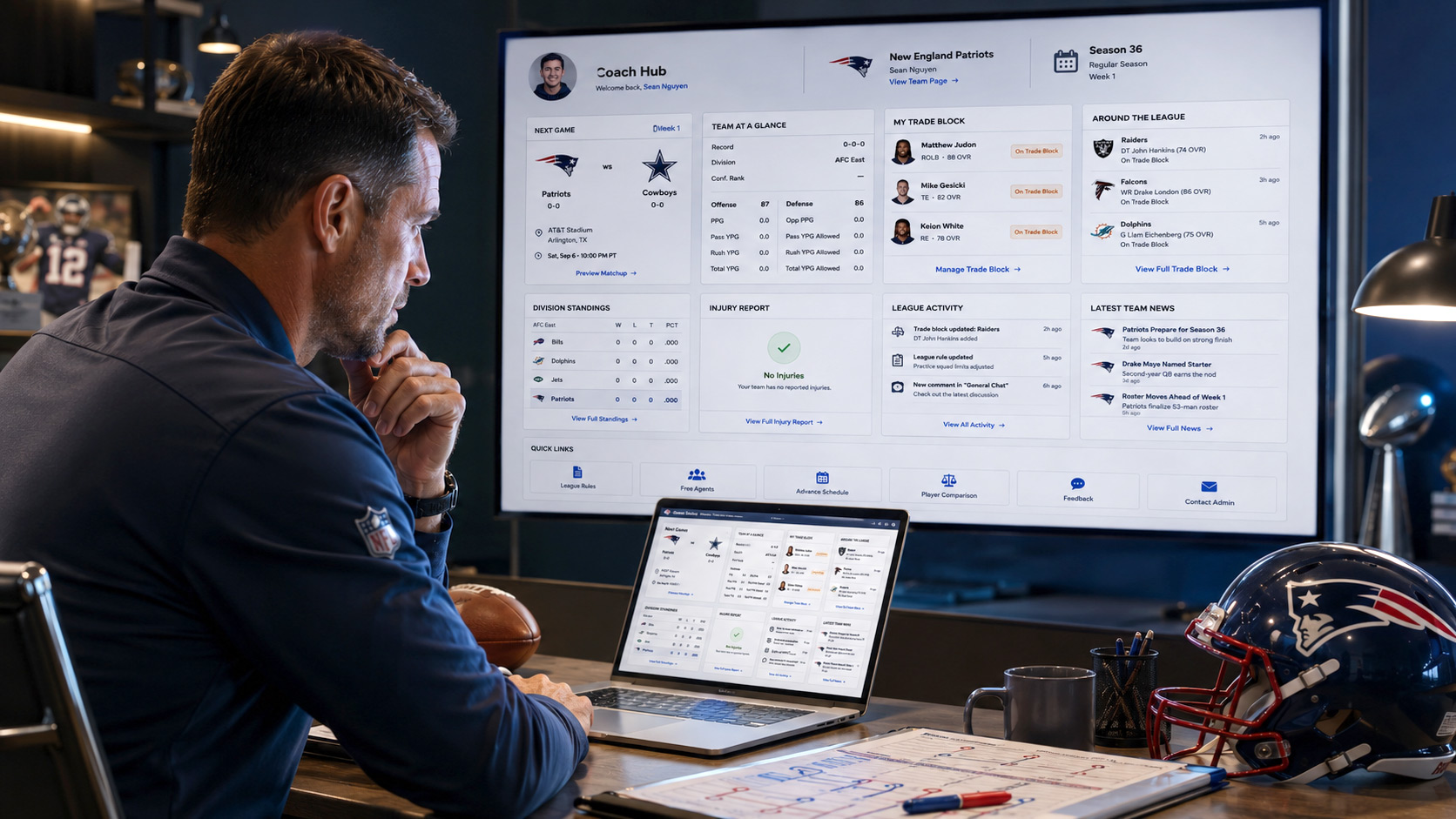
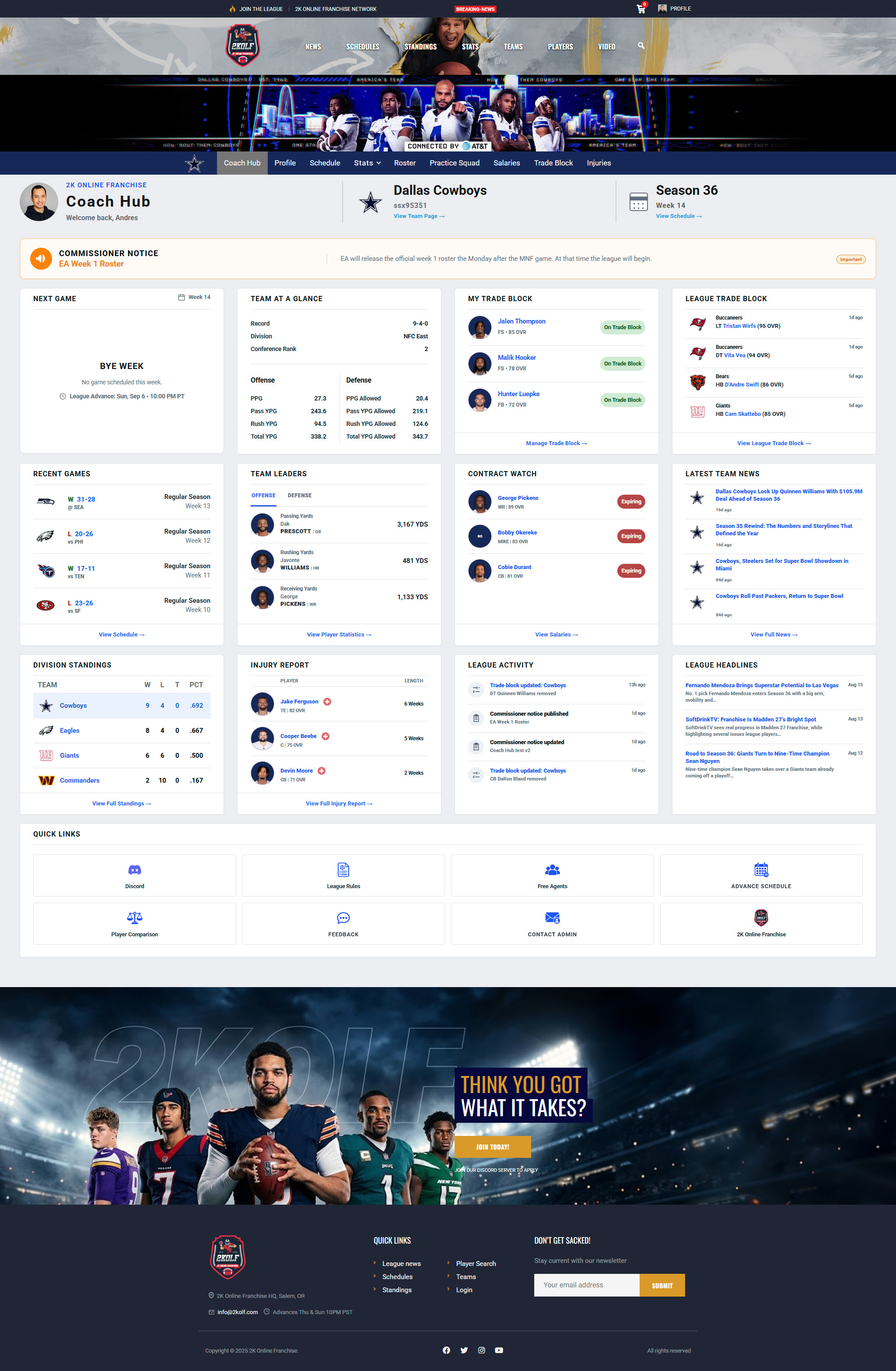
At the top of Coach Hub, you’ll immediately see who you’re logged in as, the team you control and the current season.
Everything underneath is built around that team assignment. Two coaches can visit the exact same Coach Hub page and see completely different information based on the teams they control.
Commissioner Notice
The Commissioner Notice gives us a dedicated place to put important league information directly in front of everyone.
Notices can be sent league-wide when something applies to everyone, or they can be targeted to specific coaches when the message only concerns one person or a smaller group.
Instead of relying only on Discord for something coaches need to remember, those notices can appear right at the top of Coach Hub where they’re hard to miss. That can include season-start information, roster reminders, league updates, individual follow-ups, or anything else that deserves extra visibility.
Next Game
The Next Game card gives you a quick look at what’s coming up for your team.
When a game is scheduled, you’ll see the matchup, team records, venue, league advance time and a direct link to the matchup preview. If your team is on a bye, the card switches to a dedicated Bye Week view while still keeping the next league advance visible.
Team At a Glance
Team At a Glance gives you a quick snapshot of how your team is performing.
You’ll see your current record, division and conference rank along with key offensive and defensive numbers, including scoring, passing, rushing and total yardage.
The idea is to give you a quick feel for your team without having to open a full stats page.
My Trade Block
This is one of the biggest new additions to the 2K OLF website.
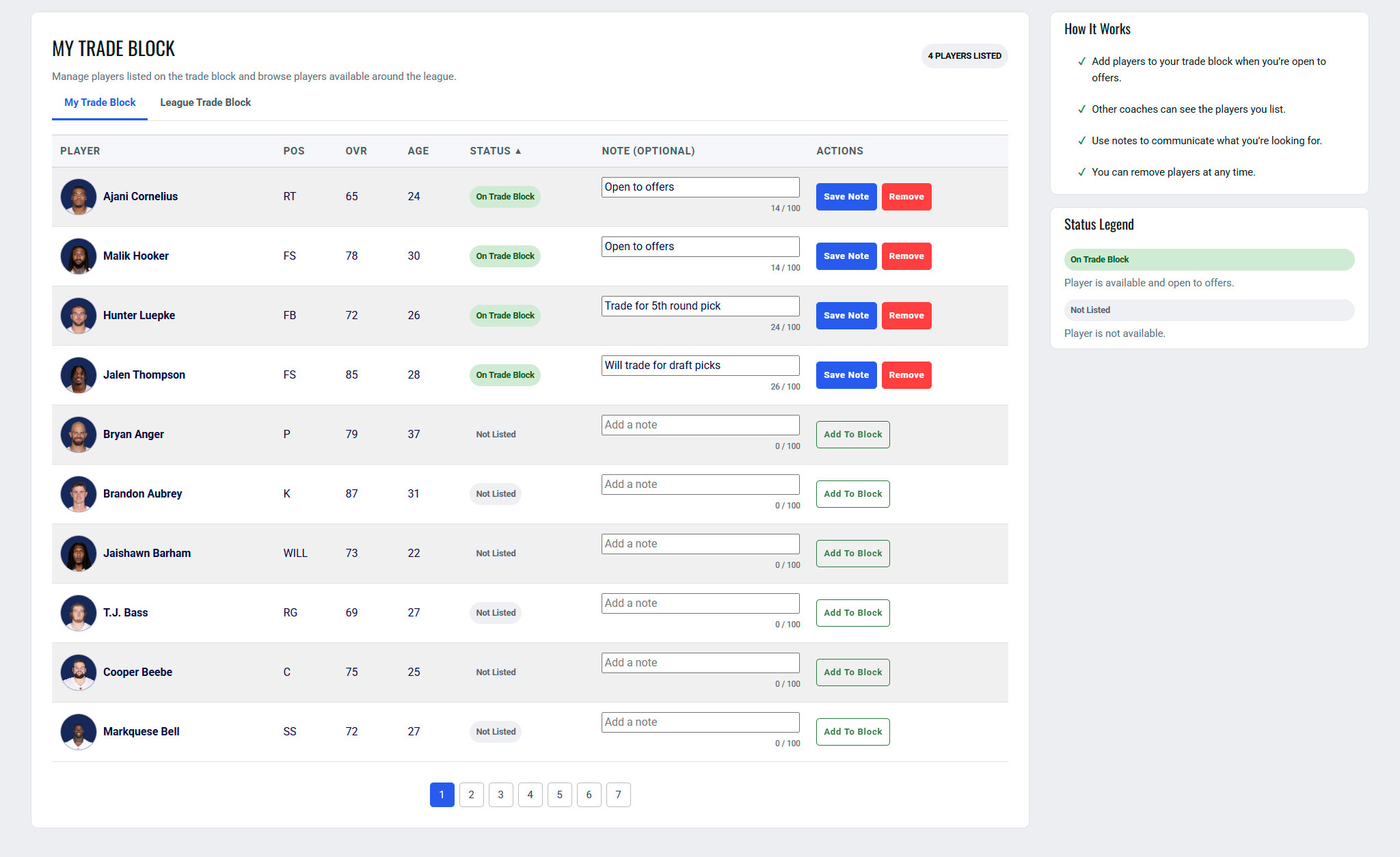
My Trade Block lets you manage the players you’re actively interested in moving directly from Coach Hub. Players you add stay attached to your team’s Trade Block until you remove them, giving other coaches a clear indication that you’re open to discussing a deal.
No more trying to remember whether someone mentioned a player in Discord three days ago.
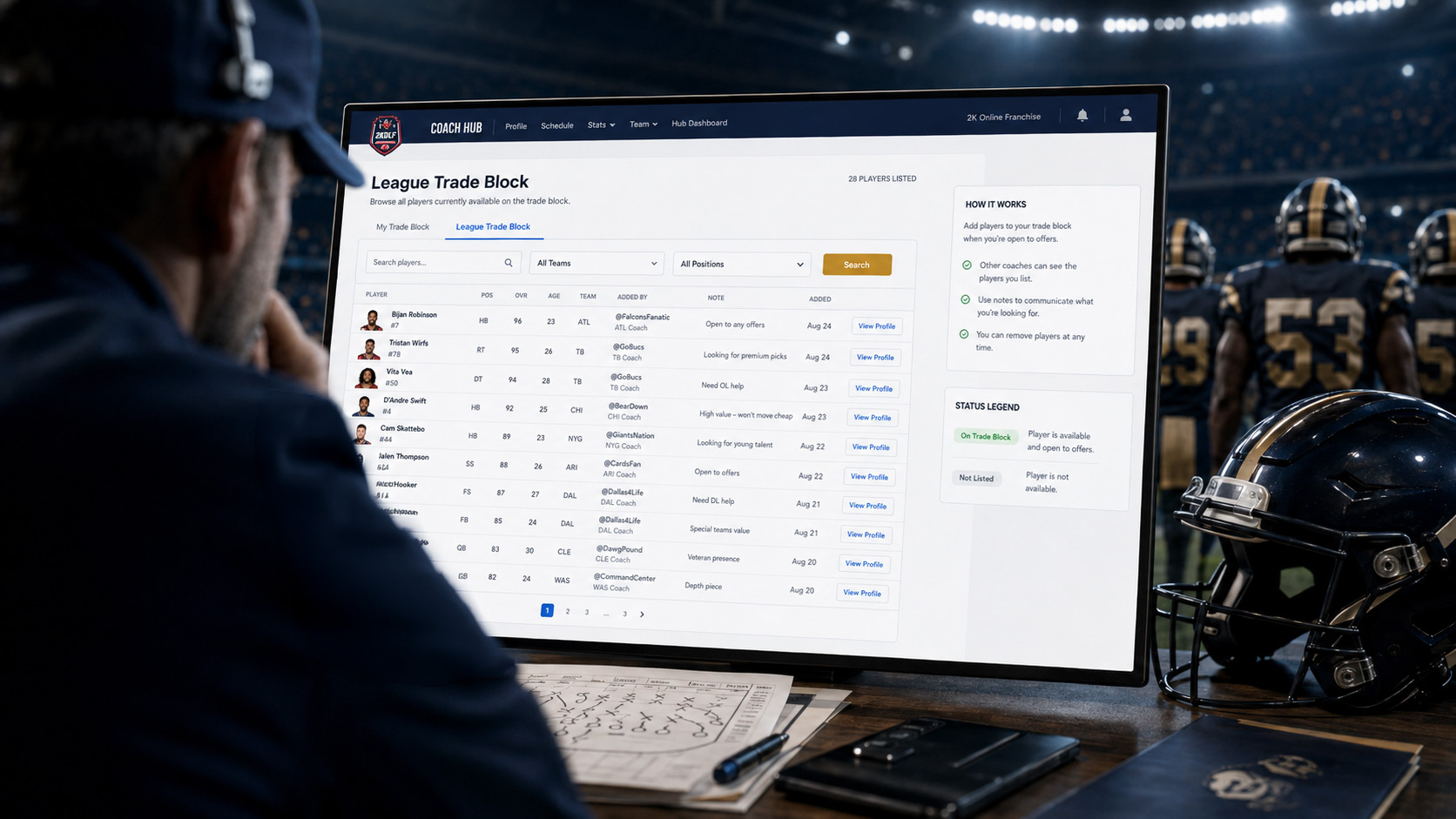
League Trade Block
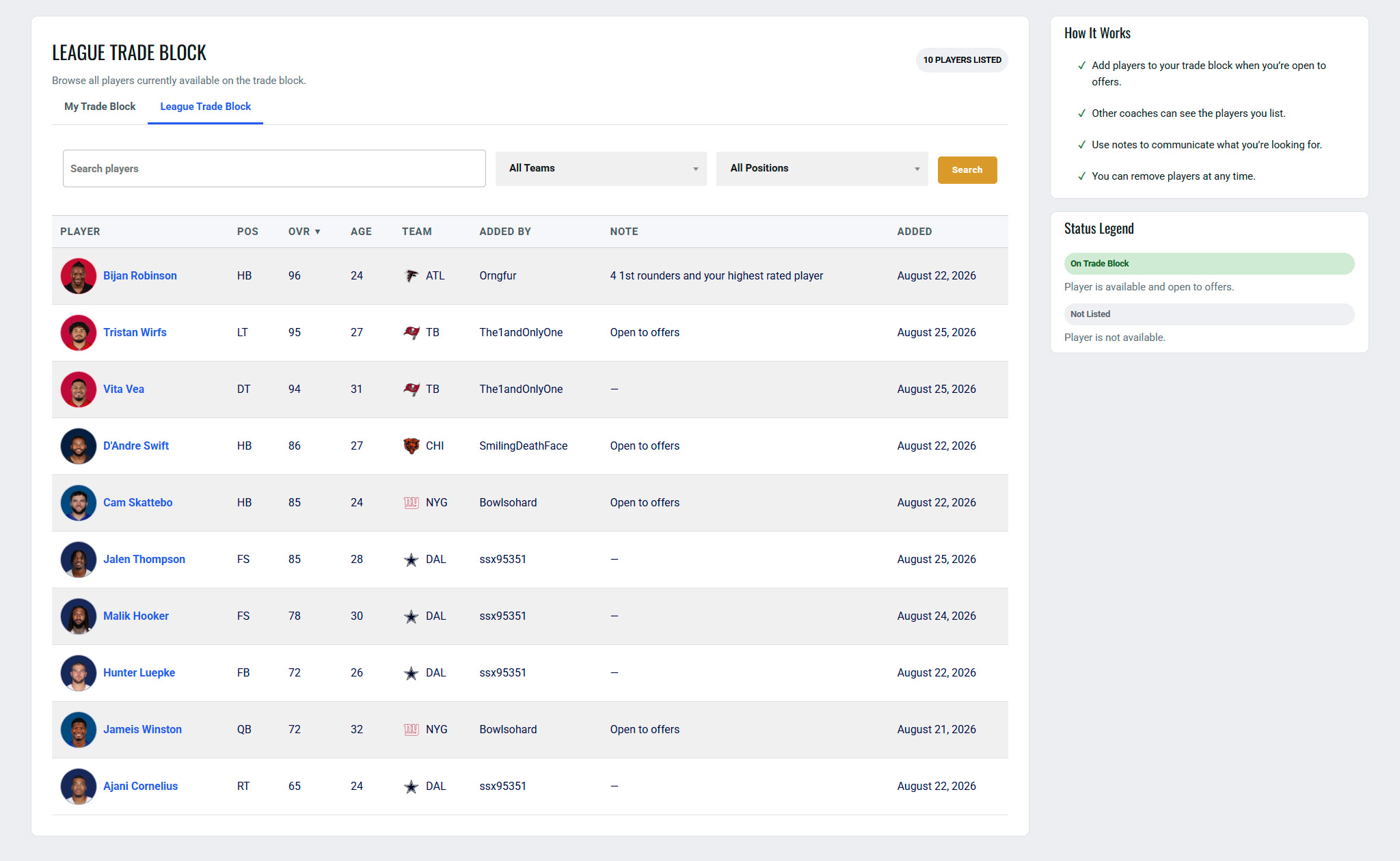
The League Trade Block lets you see who other coaches around the league have made available.
Coach Hub shows a quick snapshot of recent Trade Block listings, while the full Trade Block page gives you a broader league-wide view.
Together, My Trade Block and League Trade Block give us something we’ve never had before: a centralized marketplace for trade interest that lives directly on the league site.
Recent Games
Recent Games keeps your latest results right on the dashboard.
You can quickly see wins and losses, opponents, scores and weeks without opening your full schedule. A link at the bottom takes you to the complete schedule whenever you want to dig deeper.
Team Leaders
Team Leaders highlights some of the players currently leading your team statistically.
The component gives you quick access to key offensive leaders and links directly to the full Player Statistics section for a deeper look.
Contract Watch
Contract Watch gives you a quick look at players whose contracts deserve attention.
Instead of discovering an important contract situation later, you can see key expiring deals directly from Coach Hub and jump into the Salaries page when you want the full picture.
Latest Team News
Latest Team News keeps stories about your team close to everything else you’re doing.
Articles tagged to your team appear directly inside Coach Hub, making it easier to keep up with team-specific stories without searching through the main News section.
Division Standings
Division Standings gives you a quick look at where your team sits against the rest of the division.
You’ll see each team’s record and winning percentage, with your own team highlighted. The full Standings page is still available when you want the complete league picture.
Injury Report
The Injury Report shows up to three of your team’s current injuries directly on the dashboard.
Player portraits, positions, ratings and injury lengths give you the important information at a glance, with the full Injury Report available through the link below.
League Activity
League Activity gives Coach Hub a running sense of what’s happening around 2K OLF.
Things like Trade Block changes and Commissioner Notice updates can appear here, so coaches can quickly catch up on recent league activity when they log in.
This is also an area we can continue expanding in future versions of Coach Hub.
League Headlines
League Headlines brings broader league stories into the dashboard.
While Latest Team News focuses on your team, League Headlines gives you a quick look at recent stories from around 2K OLF.
Quick Links
At the bottom of Coach Hub, Quick Links gives you fast access to several useful league tools and destinations.
That includes Discord, League Rules, Free Agents, Player Comparison and the 2K Online Franchise homepage.
It also includes three Coach Hub-specific tools.

Advance Schedule
The Advance Schedule opens directly inside Coach Hub and shows the next scheduled league advance along with upcoming advance dates.
That gives coaches a quick way to check the timeline without leaving the dashboard.
Feedback
Coach Hub also includes a built-in Feedback form.
If you have an idea, find a problem or want to suggest an improvement, you can send it directly through the site.
Contact Admin
Contact Admin gives coaches another direct way to reach league administration from inside Coach Hub.
Messages are saved through the site and forwarded to the league admin, so there’s a record of what was submitted even if email delivery has an issue.
BottomLine
BottomLine is a new league-wide ticker that appears along the bottom of the site for logged-in Coach Hub members.
Instead of needing to return to the dashboard every time you want to see what’s happening around the league, BottomLine stays with you as you move through the site and rotates through several categories of live league information.
That includes:
- Scores - recent and completed games, including final scores and game leaders
- Latest News - recent stories from around 2K OLF
- Transactions - recent league activity such as Trade Block changes
- Standings - current division standings from around the league
- Stat Leaders - custom statistical leaderboards for passing, rushing, receiving, defense, kicking and punting
If a category has no information to show, BottomLine simply skips it and moves to the next available category.
Commissioners can also control the order of categories, how many items appear, transition style and ticker speed.
The ticker supports Slow, Normal, Fast and Custom speed settings, with Custom allowing the scroll rate to be set directly in pixels per second. No matter how much information is inside a category, the physical scroll speed stays consistent - longer categories simply remain on screen longer.
BottomLine also includes Breaking News alerts.
When something important happens, a Breaking News message can temporarily take priority over the normal ticker rotation. Alerts can be scheduled, linked to a page on the site and paired with an optional notification sound.
Coaches can mute BottomLine audio or collapse the ticker if they prefer a quieter experience.

The goal is to make the site feel more connected to what’s happening around the league, even when you’re viewing a roster, player page, statistics, news article or another part of 2K OLF.
Built for What Comes Next
Coach Hub V1 is complete, but the bigger idea is that this gives us a foundation to keep building on.
Some future ideas may make existing sections deeper, while others could introduce completely new tools. The important part is that we now have a personalized area of the site built specifically around the coach using it.
When Will Coach Hub Open?
Coach Hub will open when Season 36 officially begins.
We want everyone’s first experience with it to be connected to the real season, with the actual schedules, standings, injuries, Trade Block activity and league information in place.
When access opens, we’ll post one final announcement explaining how to log in, how accounts will work and what to do if you need access.
Until then, this is your first full look at what’s waiting for you.
Coach Hub arrives with Season 36.
I like the BottomLine section here because it explains what coaches actually experience without getting too technical about the backend stuff we spent all that time building.