Madden NFL 26 introduces a revolutionary loadout system that changes how Franchise Mode players develop their staff and gameplan. Instead of a simple talent tree, the new system gives coaches discrete slots for equipping abilities-much like equipping gear in an RPG. This article explores the mechanics behind staff loadout slots, explains how to unlock and upgrade them, outlines strategic best practices, and contrasts the system with previous Madden entries.
What Are Loadouts?
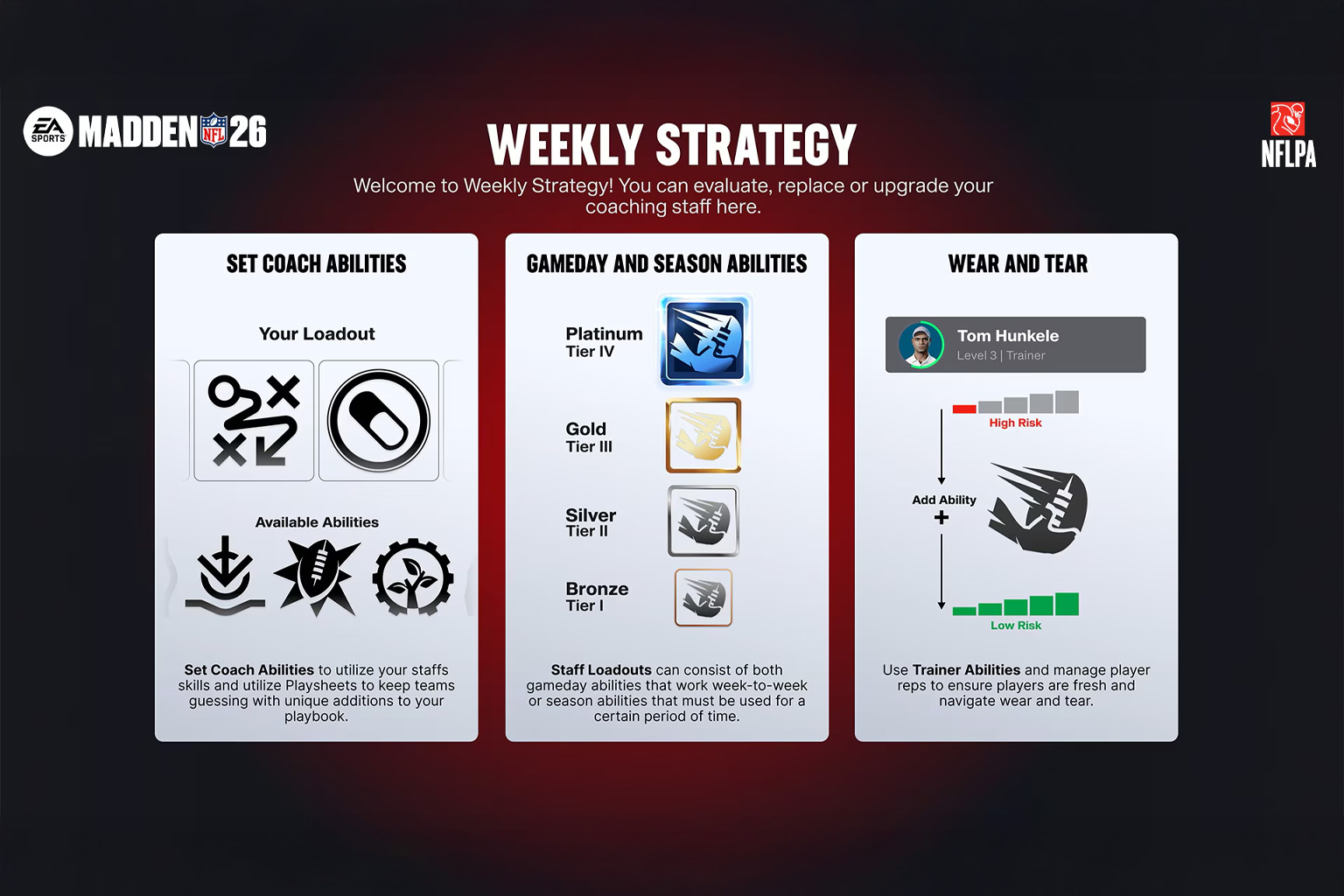
When you open the Weekly Strategy menu in Franchise Mode, you'll see that your gameplan is separated into three distinct loadouts: Staff, Play Sheet, and Trainer. Each loadout has its own slots and purpose
-
Staff Loadout - Up to six slots for equipping coach or coordinator abilities. These abilities provide game‐changing boosts such as extra XP, improved scouting, or scheme bonuses. Veteran coaches like Andy Reid start with more slots, while created coaches begin with fewer and must level up to unlock additional slots.
-
Play Sheet Loadout - Up to four slots for "mini-playbooks" that add situational plays to your main scheme. Play sheets come in different styles (West Coast, Heavy Sets, Run N Shoot, etc.) and let you tailor your play-calling to opponents.
-
Trainer Loadout - Slots for trainer abilities that manage fatigue, wear-and-tear and recovery. These abilities help keep players healthy, boost recovery rates, and reduce injury risk.
Gameday vs. Season Abilities
Abilities come in two categories:
-
Gameday abilities can be swapped out each week. They deliver immediate, on-field effects such as boosting blocking or improving red-zone efficiency.
-
Season abilities lock in for multiple weeks. They provide long-term benefits like enhanced scouting, faster player progression or improved injury recovery. Because they remain in place for several weeks, you must weigh short-term gains against long-term development.
At release, EA launched Madden with 46 Gameday abilities and 28 Season abilities. Each ability has four tiers, with upgrade goals to reach higher tiers and knockout goals that cause regression when goals aren't met. Achieving mastery at tier 4 makes an ability permanent and prevents regression.
Unlocking and Upgrading Loadout Slots
Coach Archetypes and Starting Slots
-
Madden NFL 26 allows you to create a custom coach or use a real NFL coach. Your starting loadout capacity depends on the coach:
-
Created coaches start with only three staff slots. Each archetype (Offensive Guru, Defensive Genius or Development Wizard) determines your initial ratings but doesn't change slot numbers.
-
Established coaches like Andy Reid or Mike Tomlin start with more slots, sometimes even the full six.
As your coach levels up through experience (earned by completing weekly goals, winning games and progressing players), you unlock more ability slots. Coaches gain access to six staff ability slots at Level 31 and four playsheet slots at Level 40. Levelling also earns coach credits, which you spend on unlocking and upgrading abilities.
Ability Tiers and Progression
Abilities grow stronger by completing upgrade goals (e.g., achieve a certain number of sacks or passing yards). Failing to meet knockout goals can cause an ability to regress to a lower tier, adding risk‐reward elements. Reaching the Mastery goal makes the ability permanent at tier 4. Season abilities stay active for several weeks, so planning when to activate them is vital.
Coordinators and Synergy
Your head coach isn't the only one who levels up-offensive and defensive coordinators have their own XP, goals and progression paths. An offensive guru coach can only obtain defensive abilities through the defensive coordinator, so choosing coordinators who complement your archetype is critical. Coordinators also have approval ratings and job security meters. Underperforming coordinators may regress or even get fired, while successful ones gain access to higher-tier abilities.
How Weekly Strategy Works
Match-Up Panel and Adaptive AI
The new weekly strategy is designed to feel like preparing for a real opponent. A match-up breakdown panel displays stat comparisons, key injuries, star players, coaching tendencies and even the opponent's ability loadout. This panel helps you tailor your loadout to counter your opponent's strengths and exploit weaknesses.
CPU teams follow the same rules: they scout your coach's tendencies and equip abilities accordingly. If you rely heavily on the power run game, the AI may load up on block-shedding or blitz abilities. This Opposing Coach DNA and Real-Time Coaching AI mean you cannot spam the same plays without consequences; AI defenses now mask coverages, disguise blitzes and adjust to your tendencies.
Dynamic Loadout Recommendations
Each week, the game suggests abilities and playsheets based on your upcoming opponent. For example, facing a pass-heavy team prompts coverage and blitz abilities, while a run-first opponent suggests run-stopping abilities. You can accept these recommendations or craft your own combination.
Because season abilities remain locked for weeks, you must plan when to activate long-term benefits like enhanced scouting or extra training XP. Balancing short-term performance with long-term goals is one of the deeper strategic layers of Madden NFL 26.
Wear-and-Tear and Trainer Roles
Player health has a bigger impact this year. Overusing players increases injury risk, while proper rest and substitutions mitigate wear and tear. Trainer abilities within the trainer loadout boost weekly recovery rates, reduce in-game injury chances and improve the likelihood of clearing injuries. This makes trainers essential to long-term success.
Coach Central Hub
All of these elements are managed through the Coach Central hub, where you can:
-
View and edit your head coach, coordinators and trainer, and monitor their approval ratings and job security.
-
See unlocked playsheets and abilities, preview locked items and set active abilities.
-
Track XP goals, upgrade goals and narrative objectives that grant Coach XP or coordinator XP.
Managing these systems in Coach Central is essential for optimizing loadouts and preventing regression.
Strategic Importance and Best Practices
General Tips
-
Plan your Season Abilities Early. Because season abilities remain active for multiple weeks, choose them based on your schedule. For instance, select a scouting-focused ability ("Scout's Honor") before a heavy scouting period, and switch to a recovery or XP ability during bye weeks or injury-prone stretches.
-
Use the Match-Up Panel. Examine opponent tendencies, injuries and star players. Equip abilities that directly counter their scheme-blitz-enhancing or coverage abilities against pass-heavy teams, run-stuffing abilities against ground games.
-
Balance Short- and Long-Term Goals. Don't stack only gameday boosts; ensure at least one season ability that improves scouting or player development. A balanced loadout provides immediate help and sustains long-term growth.
-
Monitor Wear-and-Tear. Use trainer abilities and rotate backups to keep starters healthy. Overusing players without trainer buffs can lead to injuries, hurting both short- and long-term success.
-
Build Staff Synergy. Choose coordinators whose strengths complement your coach archetype. An offensive guru needs a defensive coordinator with strong defensive abilities to cover weaknesses. Coordinators with high approval ratings progress faster and unlock better abilities.
Tips for Beginners
-
Start with Recommended Loadouts. When you first start, follow the game's suggested abilities and playsheets. This gives you an understanding of how each ability affects gameplay.
-
Focus on Leveling Up. Your initial coach level limits your slots. Prioritize weekly goals and training drills that grant Coach XP and coordinator XP to unlock additional slots quickly.
-
Manage One Season Ability at a Time. Too many locked abilities can hinder flexibility. Use one season ability until you're comfortable with long-term planning, then expand.
-
Use Playsheets Wisely. Load just one or two playsheets that fit your scheme (e.g., West Coast or Heavy Sets) and gradually experiment with others.
Advanced Strategies
-
Custom Tailoring Each Week. As you gain more slots, deselect and select abilities each week to target specific matchups. Combine coverage and blitz abilities against strong passing attacks or red-zone abilities versus teams that excel inside the 20.
-
Stack Synergistic Abilities. For example, pair a play-action playsheet with abilities that enhance play-action passing and route running. Combining complementary abilities creates exponential gains on the field.
-
Plan for Knockout Goals. When choosing a high-impact ability, be prepared to meet its performance goals. If you can't meet them, pick a lower-tier ability to avoid regression.
-
Manipulate Approval Ratings. Keep your coordinators' approval ratings high by meeting their goals and winning games. High approval ratings delay regression and increase XP gains. Conversely, if a coordinator underperforms, consider replacing them via the Coaching Carousel before they drag down your staff.
Differences from Previous Madden Versions
Prior to Madden NFL 26, franchise mode used a coaching talent tree where coaches spent skill points on incremental perks. Madden NFL 26 replaces the tree with a slot-based loadout system. This change brings several key differences:
-
Discrete Slots vs. Passive Perks: Instead of passively stacking perks, you now equip up to six abilities in the staff loadout and four play sheets. Only equipped abilities are active during games; unused perks have no effect.
-
Dynamic Match-Up Preparation: The new weekly strategy emphasizes opponent scouting. The match-up panel and real-time coaching AI create weekly chess matches where both user and CPU adjust gameplans. Madden 25 lacked this level of interactive preparation.
-
Opposing Coach DNA and Real-Time AI: EA's Real-Time Coaching AI uses a decade of real NFL data to mirror how coaches call plays. Defenses disguise coverages and adjust mid-game, making repetitive playcalling less effective. Madden 25's AI was more static.
-
Wear-and-Tear and Trainer Integration: Previous titles had basic injury systems. Madden 26's wear-and-tear system encourages rotation and trainer abilities that influence recovery and injury risk. This adds another layer of strategic planning.
-
Playsheets and Mini-Playbooks: Instead of fixed playbooks, coaches can equip mini-playsheets representing real NFL play-calling cards. This feature did not exist in earlier iterations.
Recommended Videos
Watching franchise experts can help you visualise how the loadout system works. Here are a few reputable videos worth checking out (click on the thumbnails below to play):
-
"Madden 26 Franchise: Coaching Abilities Explained!" - A breakdown by a popular Madden YouTuber showing how to equip abilities, manage slots and choose between gameday and season abilities.
-
"Franchise Mode Tips That You NEED To Know | Madden 26" - An EA Creator Network video that covers weekly strategy, playsheets and trainer management with gameplay examples.
-
"Madden NFL 26 vs. Madden NFL 25 - What's New?" - This side-by-side comparison highlights the differences between the old coaching tree and the new loadout system.
-
EA Sports Deep Dive Video on Franchise Mode - Official EA video detailing coach archetypes, loadouts, ability tiers and Coach Central.
Conclusion
The staff and coach loadout system in Madden NFL 26 marks a significant evolution in Franchise Mode. By replacing passive talent trees with dynamic slots, EA has created a flexible and strategic framework that rewards planning and adaptability. Success now depends on selecting the right mix of abilities, leveling up your coaches, managing wear-and-tear, and countering opponents week by week. Whether you're a beginner building your first franchise or a seasoned veteran chasing Super Bowls, mastering loadouts will be key to dominating Madden NFL 26.